 Volvenix
Applitools vs Autify
AI-enhanced independent comparison — features, pros, cons, pricing and rankings.
 ChatGPT
  Claude
  Gemini
  Midjourney
  DALL-E
  Stable Diffusion
  Notion AI
  Canva
Canva  Grammarly
  GitHub Copilot
  ElevenLabs
  Perplexity
  Runway
  Synthesia
  Fireflies.ai
  Hugging Face Hub

| Dimension | Applitools | Autify |
|---|---|---|
| Accuracy & Reliability | ||
| Ease of Use | ||
| Features & Capability | ||
| Value for Money | ||
| Performance & Speed | ||
| Popularity & Adoption |
Who each tool serves best — and when to pick the other one.
Development and QA teams at software companies who need to ensure pixel-perfect UI across browsers and devices.
- You need to catch subtle UI regressions across multiple browsers and devices automatically.
- You want seamless integration with your existing test automation and CI/CD pipelines.
- Your team requires scalable, parallelized visual testing for complex web or mobile apps.
Solo developers, hobbyists, or teams with minimal UI testing needs, or those requiring a fully open-source solution.
- You need a fully open-source visual testing solution with no vendor lock-in.
- Free-tier limits are a blocker for your high-volume or enterprise-scale testing needs.
- You require advanced API access or custom integrations not supported by the platform.
The accuracy and scalability of its Visual AI engine for cross-browser UI regression detection.
QA teams, product managers, and developers at SMBs or enterprises needing scalable, low-code browser test automation.
- You need to automate browser tests without writing code or maintaining scripts.
- You want self-healing tests that adapt to UI changes and reduce manual updates.
- Your team requires scalable, cloud-based test execution across browsers and devices.
Highly technical teams requiring deep customization or integration with complex CI/CD pipelines may find it limiting.
- You need deep customization or scripting for highly complex test scenarios.
- Free-tier limits are a blocker for teams with large-scale or frequent test runs.
- You require on-premise deployment or advanced API integrations not supported by Autify.
Ease of use for non-coders and self-healing test maintenance.
A canonical comparison across capabilities common to this category. Vendor-specific extras appear below in "Highlighted Features".
| Capability | Applitools | Autify |
|---|---|---|
|
Free Tier Available
Usable without payment (with usage limits)
|
✓ | — |
|
Free Trial
Time-limited paid-plan trial
|
— | ✓ |
| Feature | Applitools | Autify |
|---|---|---|
| Cross-browser testing | Runs tests on multiple browsers and devices | Run tests on Chrome, Firefox, Edge, and Safari. |
| Parallel Test Execution | Run multiple tests simultaneously | Run multiple tests simultaneously in the cloud. |
Each tool's marketing-listed features. Where a feature appears under one tool but not the other, it usually reflects how the vendor describes their product — not a definitive capability gap.
- Visual AI engine — Detects visual differences across browsers and devices
- CI/CD Integration — Works with Jenkins, GitHub Actions, and more
- Detailed visual reports — Provides side-by-side visual diffs and logs
- No-code Test Creation — Record browser actions to create automated tests without coding.
- Self-healing AI — Automatically adapts tests to UI changes, reducing maintenance.
- Mobile Web Testing — Test web apps on mobile browsers and devices.
- Accurate visual regression detection
- Integrates with major test frameworks
- Supports web and mobile platforms
- Parallel test execution
- Detailed visual difference reports
- No-code test creation enables non-technical users to automate testing.
- Self-healing AI reduces test maintenance when UI changes occur.
- Supports cross-browser and mobile web testing.
- Cloud-based execution scales without local setup.
- Intuitive interface and detailed reporting.
- Free plan has limited test runs per month
- Pricing for large teams or enterprise can be high
- No public API for custom integrations
- Pricing is not fully transparent and may be high for startups or small teams.
- Limited advanced scripting and customization compared to code-based frameworks.
- No public API for deep integration with custom CI/CD pipelines.
- Automated UI regression testing
- Cross-browser compatibility checks
- Mobile app visual validation
- Continuous integration visual QA
- Pixel-perfect design verification
- Automating regression testing for web applications
- Cross-browser compatibility testing
- Mobile web application testing
- Continuous integration test automation
- Reducing manual QA workload
Natural languages each tool generates and understands. Primary languages are listed first.
What each tool can accept (input) and produce (output) — text, image, audio, video, code.
Applitools offers a free plan with limited usage, and paid plans for professional and team needs. Pricing increases with test volume and advanced features.
-
Free
Free -
Pro
popular
Custom pricing -
Team
Custom pricing
Autify offers a free trial and custom pricing for paid plans based on usage and features. Pricing details are not fully public; users must contact sales for enterprise or advanced tiers.
-
Free Trial
Free · 14-day trial -
Standard
popular
Custom pricing -
Enterprise
Custom pricing
Regulatory frameworks each tool claims compliance with (HIPAA, SOC 2, GDPR, etc.).
Vendor-published numbers each tool highlights — usage scale, breadth, and operational stats. Different tools track different metrics, so direct row-by-row comparison usually isn't meaningful.
- Browsers supported 50+
- Parallel test runs Unlimited (paid)
- Test maintenance reduction Up to 80%
- Supported browsers 4+
How you can reach support — email, live chat, phone, community, docs.
- Documentation primary visit ↗
- Email primary
- Documentation
How each tool is classified in the Volvenix catalog.
These vocabulary domains are managed in our catalog but not yet exposed at the tool level. We're tracking them for future expansion of this comparison.
- Encryption Types — AES-256, ChaCha20, RSA-2048, and similar at-rest/in-transit cipher families.
- Encryption Contexts — where encryption is applied (data at rest, in transit, end-to-end).
- Plan-tier Model Mapping — which AI models are available on which pricing tier (currently only the model list is tracked, not the per-plan availability).
- What is this tool?
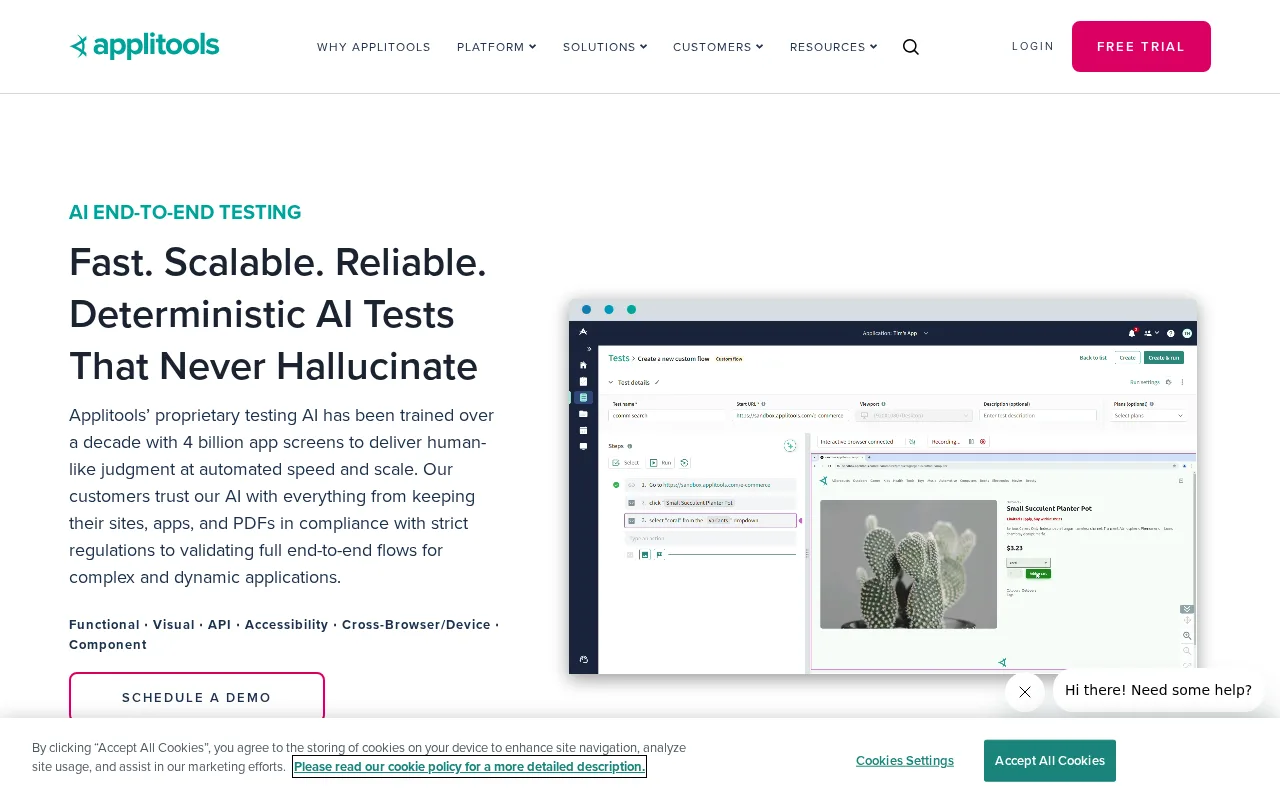
- Applitools automates visual testing for web and mobile apps, detecting UI differences across browsers and devices.
- How much does it cost?
- Applitools offers a free plan with limited usage; paid plans are available for higher test volumes and advanced features.
- Does it have a free plan?
- Yes, Applitools provides a free plan with limited test runs per month.
- What integrations does it support?
- It integrates with popular test frameworks like Selenium, Cypress, Playwright, and CI/CD tools such as Jenkins and GitHub Actions.
- Who is it best for?
- Best for development and QA teams needing reliable, automated visual regression testing across browsers and devices.
- What is this tool?
- Autify is a no-code, cloud-based platform for automating end-to-end browser testing of web applications.
- How much does it cost?
- Pricing is not fully public; Autify offers a free trial and custom pricing for paid plans.
- Does it have a free plan?
- Autify offers a free trial but does not have an ongoing free plan.
- What integrations does it support?
- Autify integrates with Slack, Jira, and CI/CD tools like CircleCI and GitHub Actions.
- Who is it best for?
- Best for QA teams, developers, and product managers seeking scalable, low-code browser test automation.
| Info | Applitools | Autify |
|---|---|---|
| Pricing | Freemium | Freemium |
| Category | AI Agents & Automation | AI Agents & Automation |
| Deployment | Cloud | Cloud |
| Free Plan | ✓ | ✗ |
| AI Agent | ✓ | ✓ |
| Autonomy | Assistant | Assistant |
| Risk Tier | Medium | Medium |
| BYO API Key | ✗ | ✗ |
| Local Models | ✗ | ✗ |
| Fine-tuning | ✗ | ✗ |
 Superblocks
 Browser Harness
 Testim
 Functionize
 SuperAGI
Applitools and Autify both have an overall score of 5.8/10 and offer freemium pricing models. Applitools specializes in visual AI testing, focusing on automated visual validation across web and mobile applications, making it suitable for teams prioritizing UI consistency. Autify provides a broader automated testing platform with a focus on end-to-end test automation and supports multiple test scenarios beyond visual checks, catering to users seeking a more comprehensive testing solution.
ⓘ How Volvenix scores work
Scores are computed by Volvenix — not supplied by the vendors, and not third-party benchmark results. Each 0–10 dimension (Overall, Features, Usability, Support, Pricing) is a directional estimate aggregated from catalog signals — editorial cataloguing, content depth, engagement, and provider-reputation indicators — so treat them as a starting point, not a lab result.
Confidence reflects how complete the underlying data is for both tools; lower confidence means fewer signals were available, not a worse tool. We never accept payment for rankings or scores. More about how Volvenix works →